Junit5结合数据驱动 yaml
JUnit5结合数据驱动-yaml
Jackson
- 使用
Jackson读取
JUnit5框架验证
pom
pom 文件导入对应相关依赖
<properties>
  <jackson.version>2.13.1</jackson.version>
</properties>


<!--yaml文件解析-->
<dependency>
  <groupId>com.fasterxml.jackson.core</groupId>
  <artifactId>jackson-databind</artifactId>
  <version>${jackson.version}</version>
</dependency>
<dependency>
  <groupId>com.fasterxml.jackson.dataformat</groupId>
  <artifactId>jackson-dataformat-yaml</artifactId>
  <version>${jackson.version}</version>
</dependency>
<dependency>
  <groupId>com.fasterxml.jackson.datatype</groupId>
  <artifactId>jackson-datatype-jsr310</artifactId>
  <version>2.13.0</version>
</dependency>
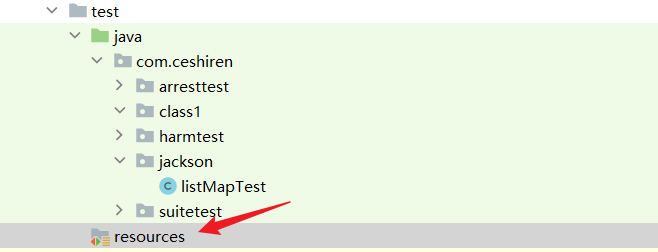
创建资源文件夹
- 在
test目录下创建resources文件夹- 如果创建是下方有
resources样式的文件夹,直接点击即可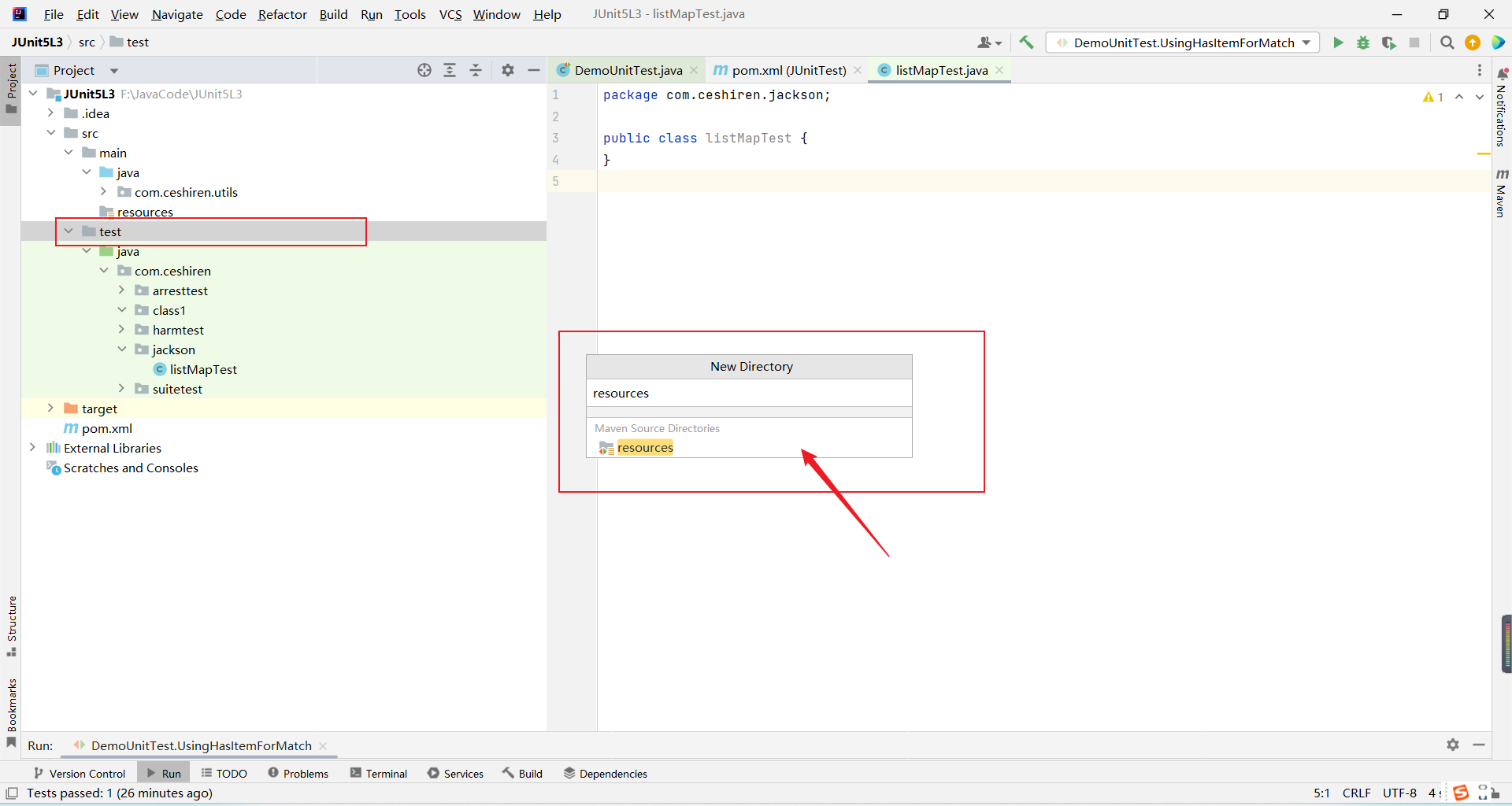
- 如果没有,那我们创建普通文件夹,后边在进行设置。
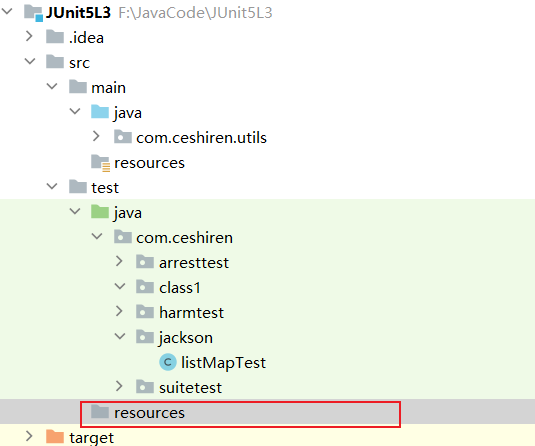
- 创建成功的文件夹目前还不可以当做配置文件,需要进行设置
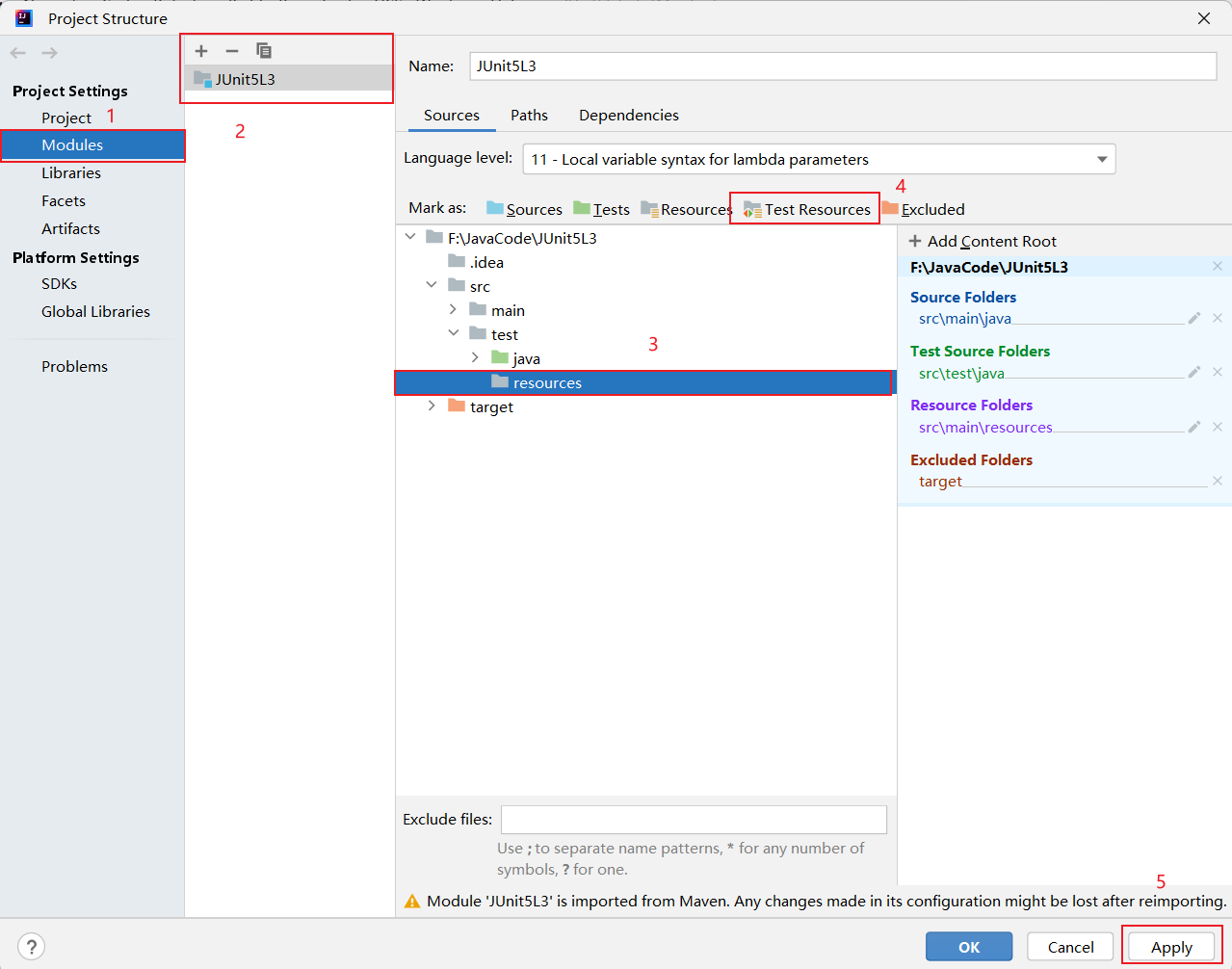
- 当图标变为下图这样,就配置成功了。
- 如果创建是下方有
解析List文件
List类型yaml
- 在 resources 包中创建 File 文件,命名时使用
.yaml后缀即可创建 yaml 文件。
orderlist.yaml
- yaml 文件中的数据结构为
List<HashMap<String,Object>>,实际为一个列表中包含不同的 HashMap,每个-后表示 List 中的不同的元素
- item: No. 9 Sprockets
  quantity: 12
  unitPrice: 1.23
  orderDate: 2019-04-17
- item: No. Widget (10mm)
  quantity: 10
  unitPrice: 3.45
  orderDate: 2022-01-16
List类型解析
- 直接声明类型{style=width:500px}
@Test
void listMapTest() throws IOException {
    ObjectMapper mapper = new ObjectMapper(new YAMLFactory());
    TypeReference<List<HashMap<String, Object>>> typeReference =
            new TypeReference<List<HashMap<String, Object>>>() {};
    List<HashMap<String, Object>> hashMaps = mapper.readValue(
            new File("src/test/resources/yaml/orderlist.yaml"), typeReference);
    System.out.println(hashMaps);
    hashMaps.forEach(hashMap -> {
        assertAll(
                () -> assertThat(hashMap.get("item").toString(), startsWith("No")),
                () -> assertThat(Integer.parseInt(hashMap.get("quantity").toString()),
                        is(greaterThan(9))),
                () -> assertThat(new BigDecimal(hashMap.get("unitPrice").toString()),
                        is(closeTo(new BigDecimal(1.0),new BigDecimal(4.00))))
        );
    });
}
实体类对应解析
实体类
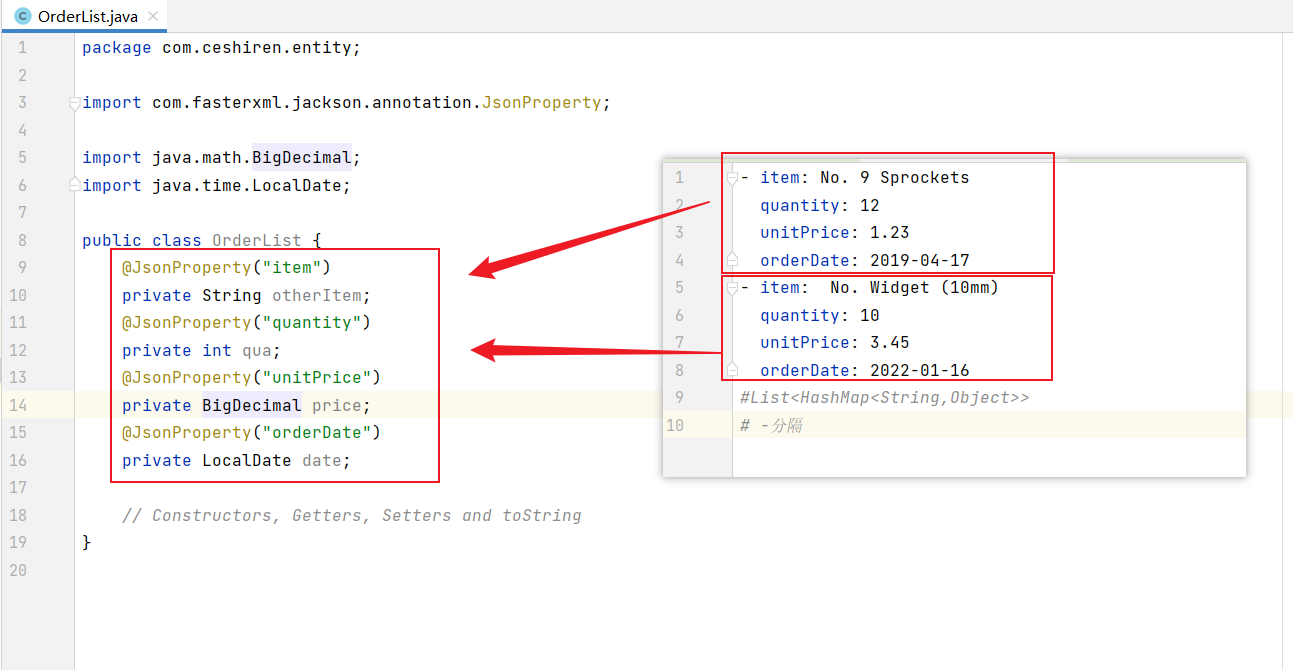
当成员变量与 yaml 的 key 不一致时,可以使用定义实体类+使用@JsonProperty 注解的方式进行自定义 key 值。
public class OrderList {
@JsonProperty("item")
private String otherItem;
@JsonProperty("quantity")
private int qua;
@JsonProperty("unitPrice")
private BigDecimal price;
@JsonProperty("orderDate")
private LocalDate date;
// Constructors, Getters, Setters and toString
}
- 生成实体类中的一些方法
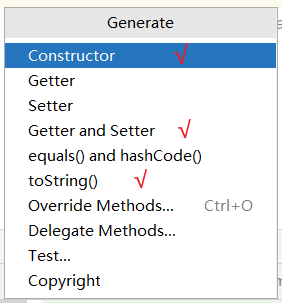
Constructors, Getters, Setters and toString
使用快捷键 alt + insert
//声明空构造方法、全参构造方法、 Getters, Setters and toString
- 代码示例
package com.ceshiren.entity;

import com.fasterxml.jackson.annotation.JsonProperty;

import java.math.BigDecimal;
import java.time.LocalDate;

public class OrderList {
    @JsonProperty("item")
    private String otherItem;
    @JsonProperty("quantity")
    private int qua;
    @JsonProperty("unitPrice")
    private BigDecimal price;
    @JsonProperty("orderDate")
    private LocalDate date;

    public OrderList() {
    }

    public OrderList(String otherItem, int qua, BigDecimal price, LocalDate date) {
        this.otherItem = otherItem;
        this.qua = qua;
        this.price = price;
        this.date = date;
    }

    public String getOtherItem() {
        return otherItem;
    }

    public void setOtherItem(String otherItem) {
        this.otherItem = otherItem;
    }

    public int getQua() {
        return qua;
    }

    public void setQua(int qua) {
        this.qua = qua;
    }

    public BigDecimal getPrice() {
        return price;
    }

    public void setPrice(BigDecimal price) {
        this.price = price;
    }

    public LocalDate getDate() {
        return date;
    }

    public void setDate(LocalDate date) {
        this.date = date;
    }

    @Override
    public String toString() {
        return "OrderList{" +
                "otherItem='" + otherItem + '\'' +
                ", qua=" + qua +
                ", price=" + price +
                ", date=" + date +
                '}';
    }
// Constructors, Getters, Setters and toString
}
测试方法
- 对应的实体类解析{style=width:500px}
    @Test
    public void orderListTest() throws IOException {
        ObjectMapper mapper = new ObjectMapper(new YAMLFactory());
        //功能上等价的便捷方法: mapper.registerModules(mapper.findModules());
        //我们需要使用 findAndRegisterModules方法,以便 Jackson正确处理我们的日期
        //Jackson也可以自动搜索所有模块,不需要我们手动注册
        mapper.findAndRegisterModules();
        TypeReference<List<OrderList>> typeReference = new TypeReference<List<OrderList>>() {
        };
        List<OrderList> orderLists = mapper.readValue(new File("src/test/resources/yaml/orderlist.yaml"), typeReference);
        System.out.println(orderLists);
            orderLists.forEach(orderList -> {
            assertAll(
                    () -> assertThat(orderList.getOtherItem(), startsWith("No")),
                    () -> assertThat(orderList.getQua(), is(greaterThan(9))),
                    () -> assertThat(orderList.getPrice(), is(closeTo(new BigDecimal(1.0),new BigDecimal(4.00))))
            );
        });
    }
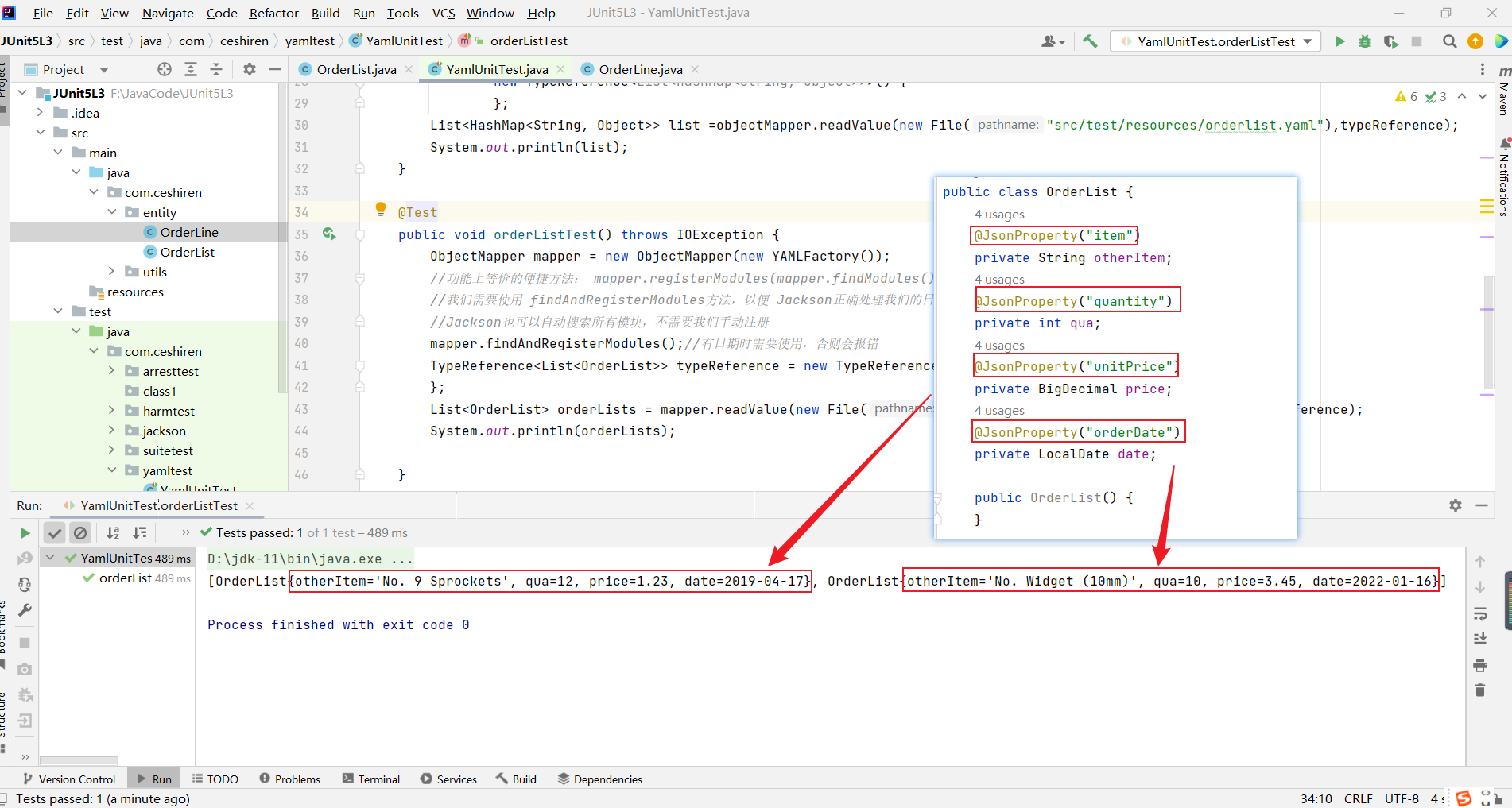
- 在实体类中使用@JsonProperty 指定字段在 yaml 文件中的属性,在读取 yaml 文件时,例如
@JsonProperty("item"),Jackson 库会将"item"字段的值赋给我们声明的otherItem属性
实体类
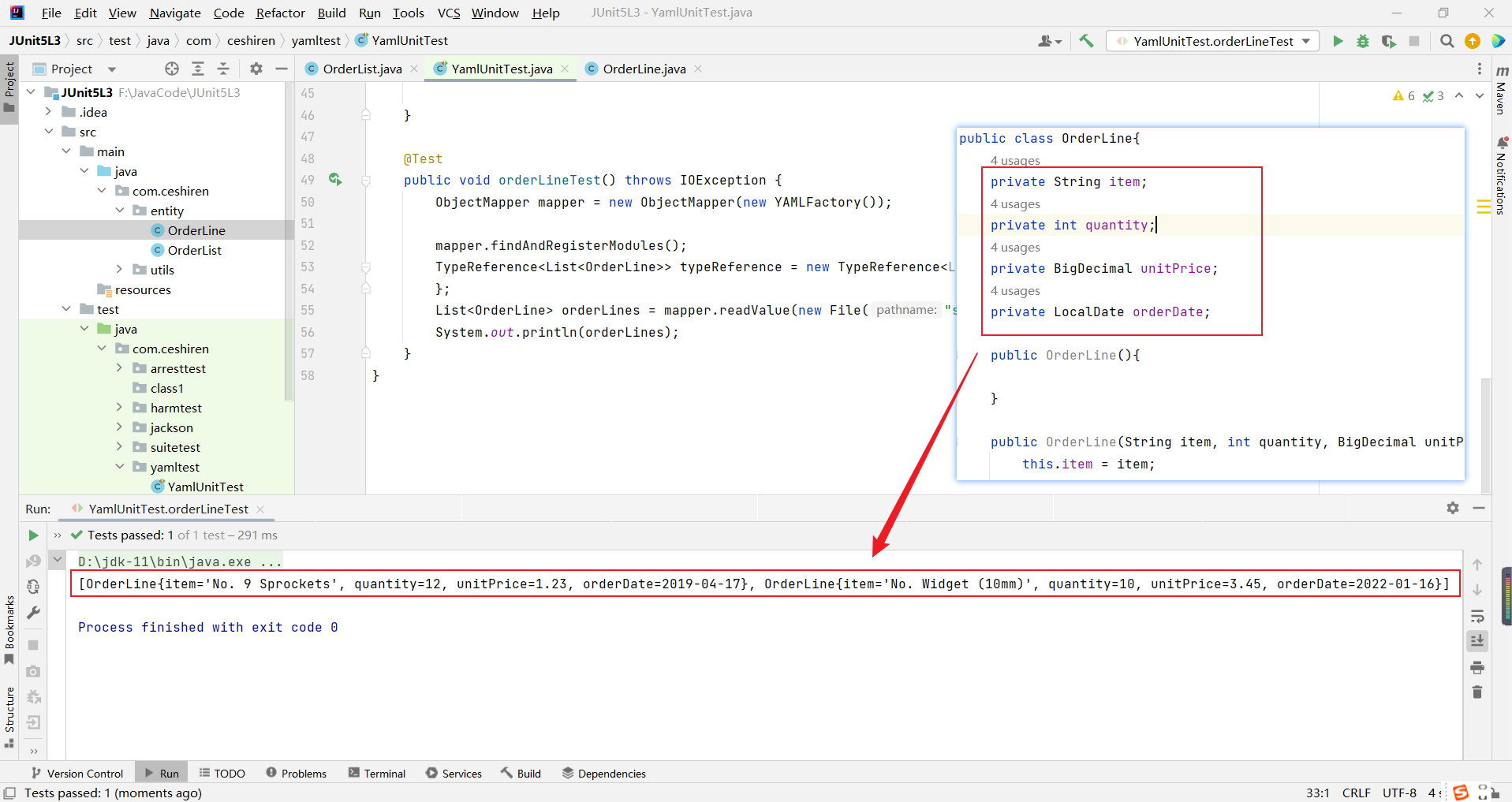
当成员变量与 yaml 的 key 一致时,声明实体类时可直接定义,无需使用@JsonProperty。
public class OrderLine{
    private String item;
    private int quantity;
    private BigDecimal unitPrice;
    private LocalDate orderDate;
    // Constructors, Getters, Setters and toString
}
- 生成实体类中的一些方法
Constructors, Getters, Setters and toString
使用快捷键 alt + insert
//声明空构造方法、全参构造方法、 Getters, Setters and toString
- 代码示例
package com.ceshiren.entity;

import java.math.BigDecimal;
import java.time.LocalDate;
//如果
public class OrderLine{
    private String item;
    private int quantity;
    private BigDecimal unitPrice;
    private LocalDate orderDate;

    public OrderLine(){

    }

    public OrderLine(String item, int quantity, BigDecimal unitPrice, LocalDate orderDate) {
        this.item = item;
        this.quantity = quantity;
        this.unitPrice = unitPrice;
        this.orderDate = orderDate;
    }


    public String getItem() {
        return item;
    }

    public void setItem(String item) {
        this.item = item;
    }

    public int getQuantity() {
        return quantity;
    }

    public void setQuantity(int quantity) {
        this.quantity = quantity;
    }

    public BigDecimal getUnitPrice() {
        return unitPrice;
    }

    public void setUnitPrice(BigDecimal unitPrice) {
        this.unitPrice = unitPrice;
    }

    public LocalDate getOrderDate() {
        return orderDate;
    }

    public void setOrderDate(LocalDate orderDate) {
        this.orderDate = orderDate;
    }

    @Override
    public String toString() {
        return "OrderLine{" +
                "item='" + item + '\'' +
                ", quantity=" + quantity +
                ", unitPrice=" + unitPrice +
                ", orderDate=" + orderDate +
                '}';
    }
    // Constructors, Getters, Setters and toString

}
测试方法
- 对应的实体类解析{style=width:500px}
    @Test
    public void orderLineTest() throws IOException {
        ObjectMapper mapper = new ObjectMapper(new YAMLFactory());

        mapper.findAndRegisterModules();
        TypeReference<List<OrderLine>> typeReference = new TypeReference<List<OrderLine>>() {
        };
        List<OrderLine> orderLines = mapper.readValue(new File("src/test/resources/yaml/orderlist.yaml"), typeReference);
        System.out.println(orderLines);
    }
- 未改变 key 值,则需在定义实体类时,属性名称需与 yaml 文件中的 key 对应。