Junit5参数化用例(二)
JUnit5 参数化用例(二)
JUnit5 @MethodSource 参数化
JUnit 5 中的 @MethodSource 注解用于指定一个或多个方法,这些方法将提供参数给参数化测试。使用 @MethodSource 注解可以实现自定义的参数源,并将提供的参数传递给测试方法。
使用 @MethodSource 注解的常见情况:
-
数据集合作为参数:如果测试方法需要使用一个集合作为参数进行多次测试,可以使用 @MethodSource 注解指定一个返回集合的方法。这个方法可以返回一个集合,每个元素都作为一个参数传递给测试方法。
-
复杂参数对象:如果测试方法需要使用较复杂的对象作为参数进行测试,可以使用 @MethodSource 注解指定一个返回对象数组或集合的方法。返回的对象数组或集合中的每个对象将作为一个参数传递给测试方法。
- 注意:
- 在 @MethodSource 注解的参数必须是静态的工厂方法,除非测试类被注释为
@TestInstance(Lifecycle.PER_CLASS) - 静态工厂方法的返回值需要和测试方法的参数对应
- 如果在 @MethodSource 注解中未指明方法名,会自动调用与测试方法同名的静态方法
- 在 @MethodSource 注解的参数必须是静态的工厂方法,除非测试类被注释为
测试方法参数对应的工厂方法返回值
| @ParameterizedTest 方法 | 工厂方法 |
|---|---|
void test(int) |
static int[] factory() |
void test(int) |
static IntStream factory() |
void test(String) |
static String[] factory() |
void test(String) |
static List<String> factory() |
void test(String) |
static Stream<String> factory() |
void test(String, String) |
static String[][] factory() |
void test(String, int) |
static Object[][] factory() |
void test(String, int) |
static Stream<Object[]> factory() |
void test(String, int) |
static Stream<Arguments> factory() |
void test(int[]) |
static int[][] factory() |
void test(int[]) |
static Stream<int[]> factory() |
void test(int[][]) |
static Stream<int[][]> factory() |
void test(Object[][]) |
static Stream<Object[][]> factory() |
单参数 @MethodSource 参数化
两种使用方法:
- @MethodSource() 传入方法名称
- @MethodSource 不传入方法名称,找同名的方法
- 代码示例
/**
 * @Author: 霍格沃兹测试开发学社
 * @Desc: '更多测试开发技术探讨,请访问:https://ceshiren.com/t/topic/15860'
 */

public class MethodSourceTest {

    // @ParameterizedTest 注解指明为参数化测试用例
    @ParameterizedTest
    // 第一种在 @MethodSource 中指定方法名称
    @MethodSource("stringProvider")
    void testWithLocalMethod(String argument) {
        assertNotNull(argument);
    }

    static Stream<String> stringProvider() {
        // 返回字符串流
        return Stream.of("apple", "pear");
    }

    // @ParameterizedTest 注解指明为参数化测试用例
    @ParameterizedTest
    // 第二种在 @MethodSource 不指明方法名,框架会找同名的无参数方法
    @MethodSource
    void testWithRangeMethodSource(Integer argument) {
        assertNotEquals(9, argument);
    }

    static IntStream testWithRangeMethodSource() {
        //int类型的数字流
        return IntStream.of(1,2,3);
    }
}
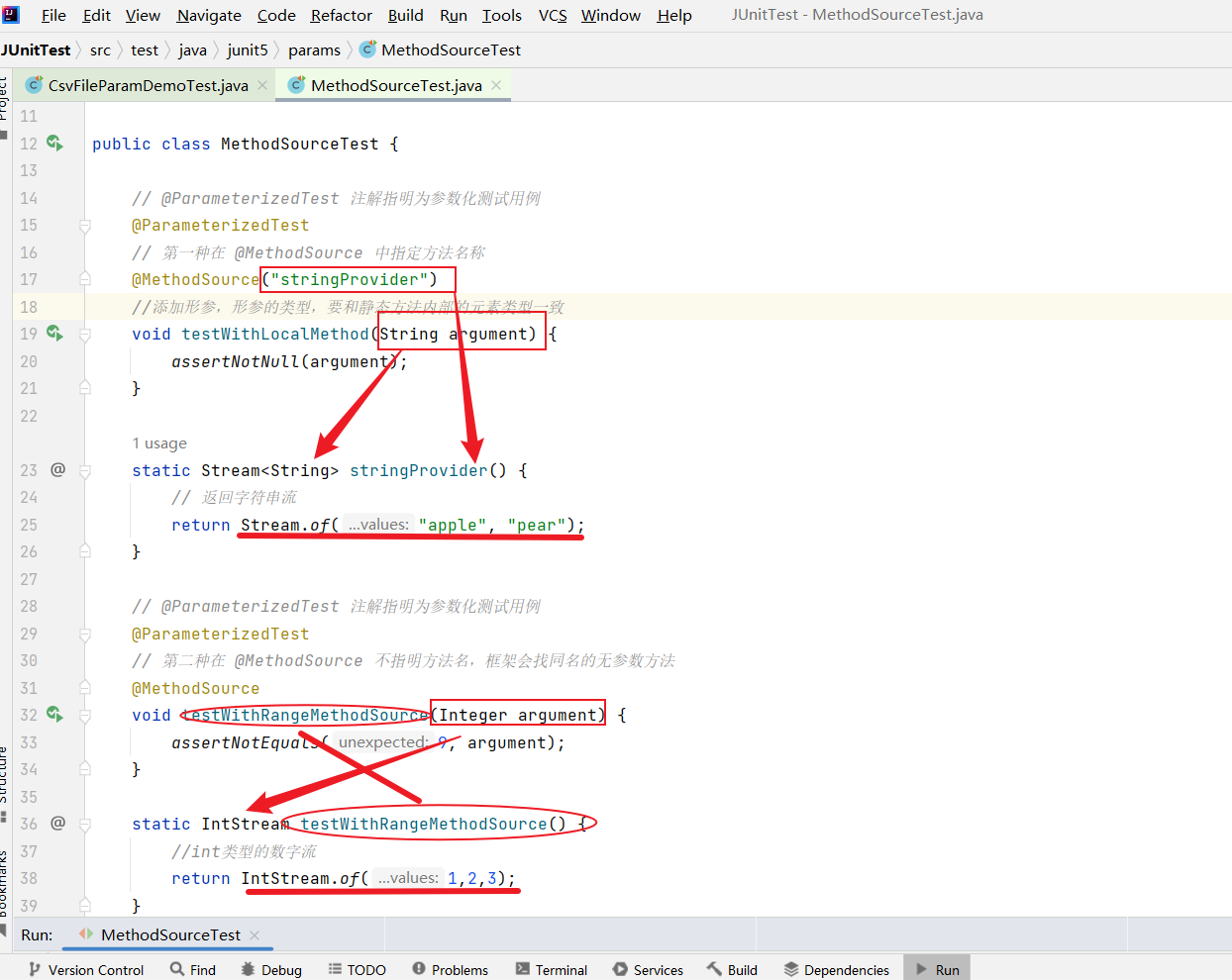
- 这里需要主义使用@MethodSource()传入方法名称需要与工厂方法名称对应,使用@MethodSourc 不传入方法名称会默认寻找同名方法。记得在测试方法中添加形参,形参的类型,要和静态方法内部的元素类型一致。
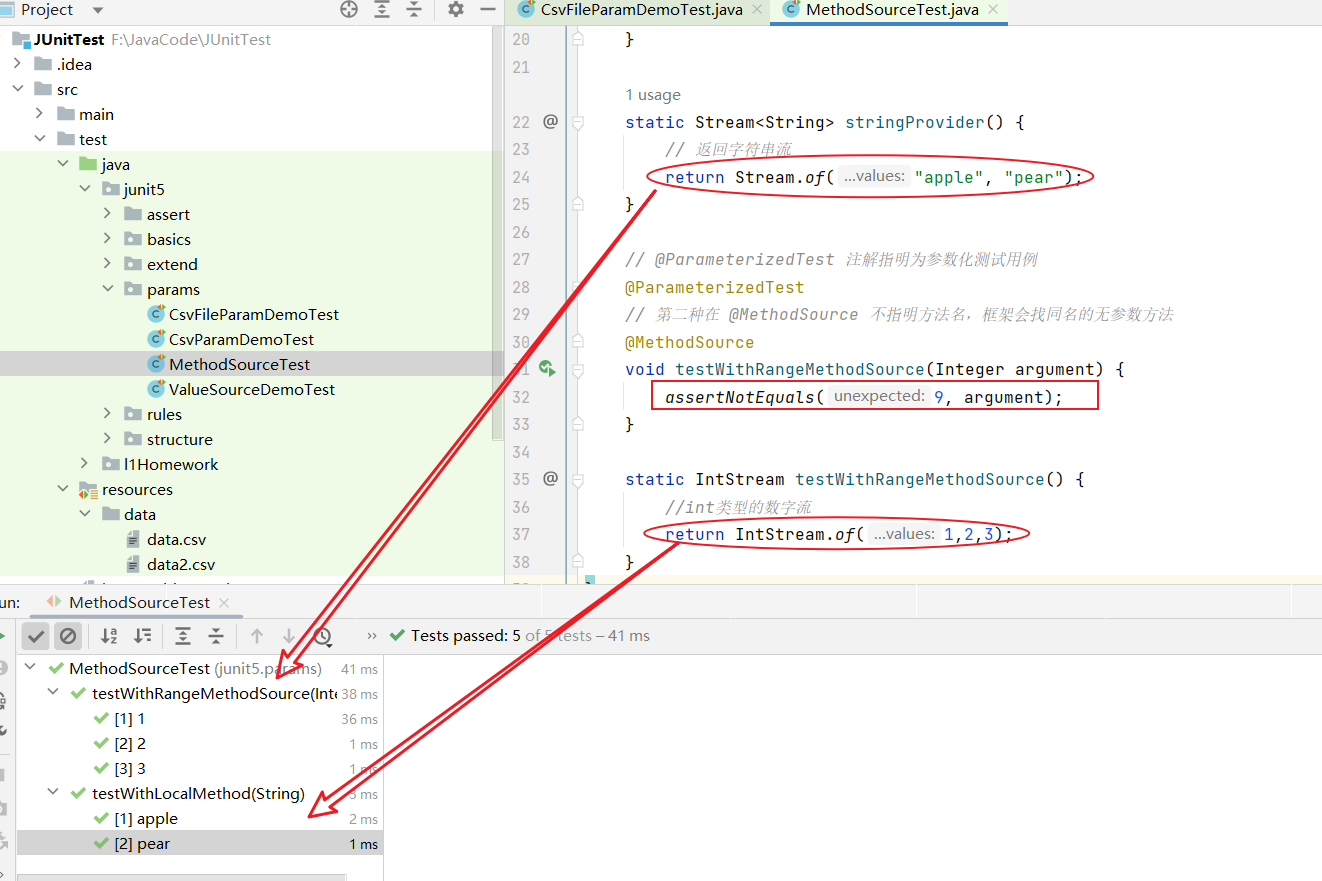
- 执行结果可以看到使用@MethodSource 将测试方法单参数化成功,注意针对不同的参数对应的工厂方法返回值不同。
多参数 @MethodSource 参数化
同样有两种使用方式:
- @MethodSource() 传入方法名称
- @MethodSource 不传入方法名称,找同名的方法
- 代码实例
public class MultiMethodParamDemoTest {
    // @ParameterizedTest 注解指明为参数化测试用例
    @ParameterizedTest
    // @MethodSource 不指明方法名,框架会找同名的无参数方法
    @MethodSource
    // 多个参数和种类, 包含字符串、整型
    void testWithMultiArgsMethodSource(String str, int num) {
        assertEquals(5, str.length());
        assertTrue(num >= 2 && num <= 3);
    }
    static Stream<Arguments> testWithMultiArgsMethodSource() {
        // 返回 arguments(Object…)
        return Stream.of(
                arguments("apple", 2),
                arguments("pears", 3)
        );
    }
}
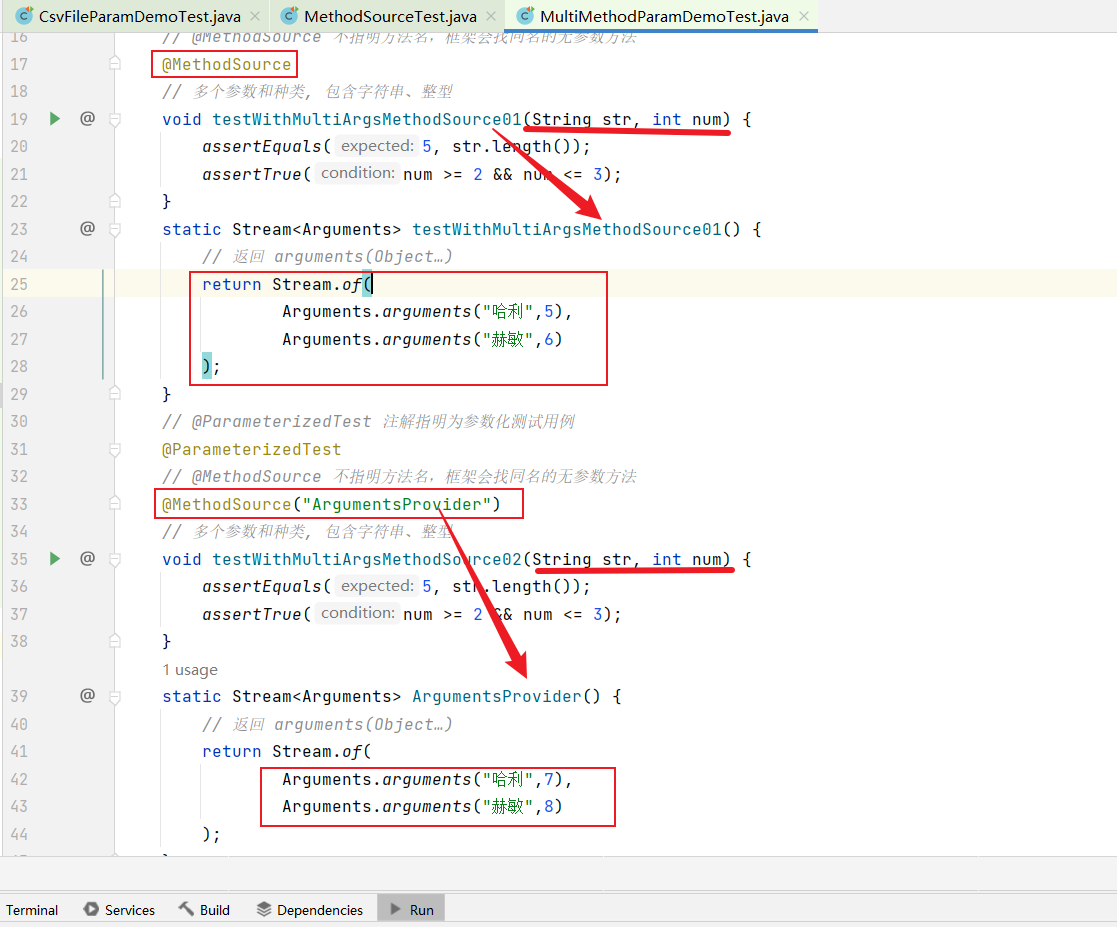
- 当多参数的数据类型不统一时,JUnit5 中推荐的方式是使用
Stream<Arguments>,返回时使用Arguments.arguments(参数1,参数2,...)拼接不同参数,注意参数类型与测试方法中的形参需对应。